Changing Direct Deposit For Disability Benefits
Changing banks involves more than opening an account. Identify which benefits you receive, choose the correct update route, and keep the request separate from the payment you later check.
 AI-assisted editorial illustration.
Plan The Change And Check The Result
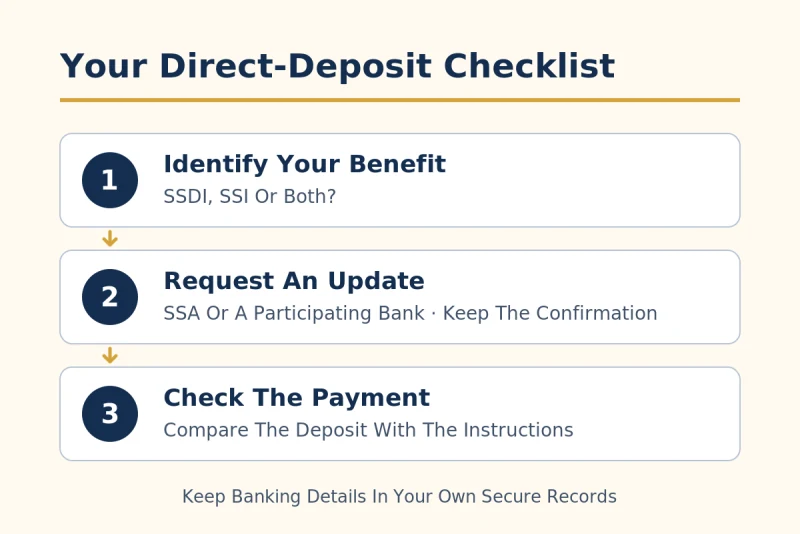
Use the checklist to track your update route, the request confirmation and the payment you need to check.
Use The Changeover ChecklistIdentify The Payment You Want To Change
Start with your benefit notice. Are you receiving Social Security Disability Insurance (SSDI), Supplemental Security Income (SSI), or both? That distinction helps you choose the correct update route. This guide concerns benefits already being paid, not bank details for a new application.
SSA’s address and direct-deposit FAQ describes online updates for Social Security benefits, including disability benefits, but says that service is not available for SSI payments. Being able to view an SSI payment method online does not mean you can change it there.
If you receive both benefits, ask SSA which payment records need attention and how to confirm each update. Do not assume that changing one record changes every payment. For background on the two programs, see our concurrent-benefits guide.
Choose An Official Update Route
Open SSA’s Update Direct Deposit page yourself. It offers an account sign-in route and explains that the next steps depend on your benefit type. Follow the instructions shown for your record; if an online update cannot be completed, use the next steps SSA provides.
For SSI, the agency’s change-reporting page directs recipients to call about changes to the account used for direct deposit. It says you need your current direct-deposit routing and account numbers for a phone change. Have the new bank’s correct deposit details available separately, and ask SSA what it needs for your request.
SSA lists 1-800-772-1213 for direct-deposit questions and 1-800-325-0778 for TTY users who are deaf or hard of hearing. Check the official page for current service hours and appointment options. An account restriction or an instruction to attend an appointment needs follow-up; this guide cannot remove it.
Share banking details only through the official process you have chosen. Do not put account numbers, Social Security numbers, passwords or verification codes into this website’s chat or the printed checklist below.
Ask Whether Your Bank Offers Automated Enrollment
SSA also describes a bank-assisted option called Automated Enrollment, or ENR. A participating bank can send updated direct-deposit information to SSA. Not every bank offers ENR, so ask before relying on it.
Useful questions for the bank are: “Do you offer SSA Automated Enrollment for this change?” and “What will you give me to show that the request was sent?” These are suggested questions, not a guarantee that the bank can handle your particular request.
Opening an account and arranging a benefit-payment update are separate tasks. If the bank does not offer the service, return to SSA’s instructions. Before closing an old account, discuss the transition with the bank and SSA, especially if an account is already closed, restricted or suspected of being compromised.
Track The Request And The Deposit Separately
Keep any confirmation in your own secure records. Ask which payment is expected to use the new details and what to do if it does not. A date on your request, a bank’s transmission receipt and an actual benefit deposit describe different events. This guide does not promise a processing time or that the next payment will reach the new account.
When checking the result, compare what SSA or the bank told you with what actually happened. If the answer is unclear, follow up through the same official contact route and explain the date and method of your request. Do not guess that a missing deposit means the underlying benefit has ended.
If you receive SSI, keep other reporting duties in view. SSA’s reporting guidance also lists changes to bank accounts and balances. Ask about any separate report needed for your circumstances; a payment-destination update is not a general review of your SSI eligibility.
Your Private Changeover Checklist
Print this original checklist to organize the task. It is not an SSA form or a request to change a payment. Keep account details in your secure bank records, not on this page.
- Request Date And Method: ____________________
- Payment To Check And Instructions Received: ____________________
- Result Or Question Still Open: ____________________
For a wider review of award and payment notices, use our after-approval guide. This page handles the narrower task of arranging and checking a deposit change.
Sources And Scope
Sources checked October 21, 2026: SSA Update Direct Deposit; SSA SSI Change Reporting; SSA Address And Direct-Deposit FAQ.
Prepared with AI assistance and checked against the linked official sources; no attorney review is claimed. General administrative information, not individual legal or financial advice. Glassman Disability is not SSA or a bank. This page cannot access your account, submit an update or confirm a payment. International banking and representative-payee arrangements may require different instructions; ask SSA about the applicable process.
Use the printable prompts privately. This page does not collect your notes or assess eligibility. Checklist selections are not saved by this page.