
How To Request Your Social Security Disability Case Documents
Need to read the documents in your disability case? Start by identifying what you want, choosing an official request route, and keeping the request separate from the copy you eventually receive.
 AI-assisted editorial illustration.
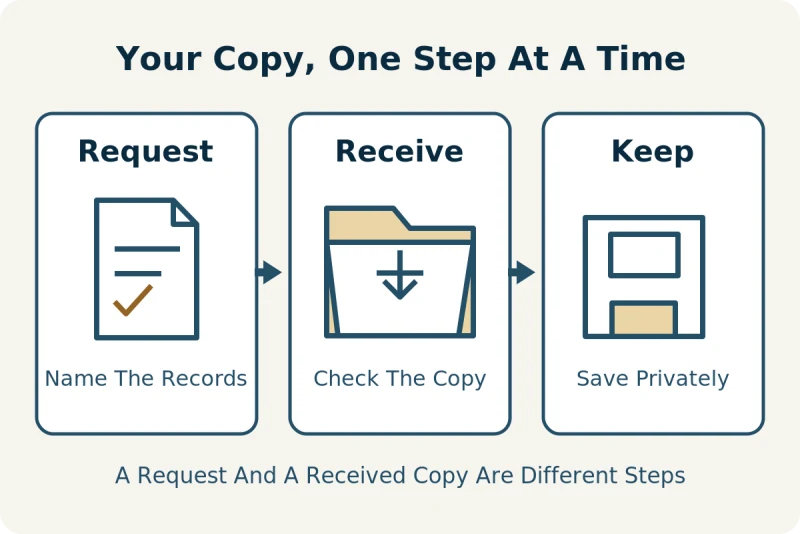
Request, Receive, And Keep Your Copy
Keep the request, the copy received and any open question distinct.
Use The Request-And-Copy RecordIdentify The Documents You Want
A case-document request asks for records, not an update on when SSA will decide your claim. Write a short description of what you need: for example, the documents in your pending disability case or a particular notice. Keep any letter that prompted the request beside that description.
Do not assume that checking an application status screen also requests the case file. Our application-status guide addresses that separate task. If you are unsure whether you need the whole case record or a particular item, make that the first question you ask SSA.
Ask About A Copy Of Your Pending Case
SSA’s electronic case-documents guidance describes an option for people who have applied for SSDI or SSI and are waiting for a decision. You can ask the field office or hearing office where your case is pending to send a copy of the electronic case documents to your personal my Social Security Message Center.
This starts with a request to the office. It is not a promise that every account already contains a downloadable file. A useful opening question is: “I would like a copy of my electronic case documents. Is this the office handling my pending case, and what do I need to do to request the copy?”
Use the agency contact on your own correspondence or the office links in SSA’s guidance. Note which office you reached, what it asked you to do, and any follow-up instructions. If you only left a message, record that rather than marking the documents as requested and confirmed.
Check The Separate Own-Records Request
SSA also publishes instructions for an electronic request to access your own records. That process requires online identity verification. It is for the record holder, age 18 or older, requesting one of the listed record types. SSA says it cannot accept this electronic request from someone completing it on the record holder’s behalf.
The listed types include medical records from a claims folder, applications, award or denial notices, and appeal requests. Read the current list before starting. This is a separate request process; do not assume it follows the same delivery steps as the pending-case Message Center option.
If you cannot or do not want to request records electronically, the same SSA page points to its other records-request instructions. Ask which route fits your situation. This guide does not explain requests for another person’s records, appointment of a representative, or permission to disclose records to somebody else. Keep those questions separate from asking for your own copy.
Receive And Save The Copy
For the pending-case Message Center option, SSA says it sends a notification according to your email or text preferences after the office sends the documents. In your account, open Message Center and the notice that the electronic case documents are ready, then open the PDF link. Follow the current labels shown by SSA.
SSA says these PDFs are available for 30 days and can be saved or printed. If the link has expired, its instructions say to request a new copy. Save the copy privately while it is available. The download window is not a period for appealing a decision.
Open the saved file to check that it is readable and belongs to you. Keep the original downloaded file intact; put questions in a separate note. If something you expected is missing or you cannot open the file, describe the problem to the office instead of assuming the case itself is incomplete. Record what you actually received, not what you expected to receive.
Your Private Request-And-Copy Record
Use these optional prompts on paper. They are an original organizing aid, not an SSA form or a records request. Use short descriptions; keep identification numbers, passwords, verification codes and medical documents out of the worksheet and this website’s chat.
- Documents I Want And Why:
- ____________________
- Office Or Official Request Route, And Date:
- ____________________
- Instructions Or Confirmation Actually Received:
- ____________________
- Copy Saved, Private Location, Or Question Still Open:
- ____________________
Keep any action required by a notice on its own task list. Do not assume a request for records files an appeal or changes a deadline. If a notice needs attention, follow its instructions while asking about the documents. This guide does not calculate a deadline, guarantee a complete file, or promise a delivery time.
Sources And Scope
Official source text reviewed November 2, 2026: SSA: Get Your Electronic Case Documents Online and SSA: Submit An Electronic Request For Access To Your Records. Service availability and account labels can change; follow the agency’s current instructions.
Prepared with AI assistance and source checking. No attorney review is claimed. This is general administrative information, not individual legal advice. Glassman Disability is not SSA, cannot access your account, and does not request your case file through this page. The checklist and paper prompts are optional; they do not transmit a request or establish eligibility.
For another preparation task, browse the Resource Center. Keep completed notes private.
Use the printable prompts privately. This page does not collect your notes or assess eligibility. Checklist selections are not saved by this page.